# The Magic Behind the Words: How Teleprompters Work
Have you ever watched a live news broadcast, a political speech, or even a recorded online video and wondered how the speaker delivers their lines so flawlessly? The secret isn’t necessarily a photographic memory or hours of intense memorization. More often than not, the answer lies in a clever piece of technology known as a teleprompter. This device, often unseen by the audience, plays a crucial role in ensuring smooth and professional delivery, allowing presenters to maintain eye contact with their audience while reading their script.
Teleprompters, also known by various names such as autocues or prompt systems, are sophisticated tools designed to display a script in front of a camera lens. They project the text onto a one-way mirror or a specialized glass positioned directly in front of the camera. This allows the speaker to read the words as if they were looking directly at the camera, creating a seamless illusion of direct engagement and natural speech. The technology has evolved significantly over the years, from early mechanical contraptions to the digital, sophisticated systems we see today.
## The Anatomy of a Teleprompter
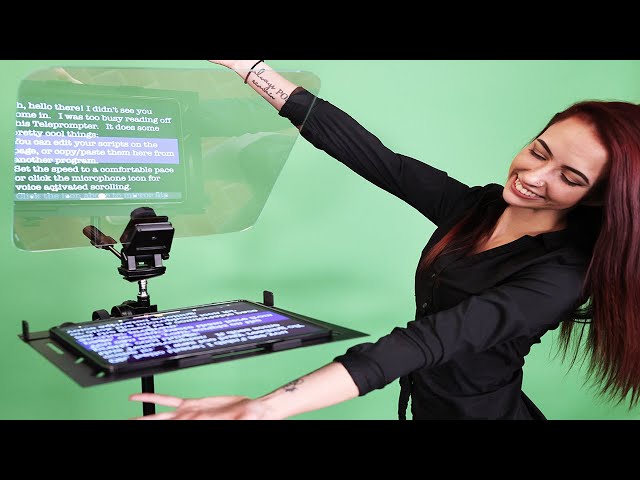
At its core, a teleprompter system consists of several key components that work in harmony: a display device, a prompt screen (usually a one-way mirror), and control software.
### Display Device: The Source of the Script
The script is typically stored and managed on a computer or tablet running specialized teleprompter software. This software allows for text formatting, speed control, and sometimes even the ability to remotely control the scrolling speed.
### Prompt Screen: The Reflective Interface
This is the most distinctive part of a teleprompter. It’s a piece of glass, often a one-way mirror, placed at an angle in front of the camera lens. The text from the display device is projected onto this glass. The one-way nature of the mirror is crucial: it allows the text to be visible to the speaker while remaining invisible to the camera’s lens.
### Control System: Orchestrating the Flow
A remote control, often a foot pedal or a handheld device, allows the speaker or an operator to control the teleprompter’s scrolling speed. This ensures the text moves at a pace that matches the speaker’s natural speaking rhythm, preventing them from rushing ahead or falling behind.
## How the Illusion is Created
The magic of the teleprompter lies in its ability to create a transparent text display. The one-way mirror allows light from the display to reach the speaker’s eyes, making the text appear as if it’s floating in the air or superimposed on the scene behind it. However, the mirrored surface reflects only a portion of the light, and the rest passes through to the camera. This means the camera captures the speaker’s image without the text being visible in the final recording or broadcast.
A typical teleprompter setup involves a monitor placed below the camera, shining text upwards onto a piece of angled glass that sits directly in front of the lens. This glass is partially silvered, meaning it reflects some light and transmits the rest. The speaker sees the reflected text superimposed on the background, while the camera, positioned behind the glass, sees through it and records the speaker without the text.
## Types of Teleprompters
Teleprompters come in various forms, each suited for different applications:
* **Camera-Mounted Teleprompters:** These are the most common type, with the screen and mirror assembly attached directly to the camera’s lens. They are widely used in news studios and for video production.
* **Presidential Teleprompters:** These consist of two angled glass panels placed on either side of a lectern. The speaker can see the script on both sides, allowing them to address different sections of an audience.
* **Beamsplitter Teleprompters:** Similar to camera-mounted ones, these use a beamsplitter (a type of glass that reflects and transmits light equally) to project the image.
* **Tablet and Smartphone Teleprompters:** Smaller, more portable versions that use a tablet or smartphone as the display. These are popular for social media creators and small-scale productions.
## Benefits of Using a Teleprompter
The advantages of using a teleprompter are numerous, contributing to more polished and effective communication.
* **Improved Delivery:** Speakers can focus on their delivery, tone, and facial expressions rather than struggling to remember lines.
* **Enhanced Accuracy:** Ensures that the exact script is delivered, which is crucial for legal, technical, or public statements.
* **Time Efficiency:** Reduces the need for extensive memorization, saving valuable preparation time.
* **Professionalism:** Contributes to a more professional and confident appearance on camera.
* **Eye Contact:** Allows speakers to maintain natural eye contact with the audience or camera.
## Teleprompter Usage in Different Fields
### News Broadcasting
News anchors rely heavily on teleprompters to deliver breaking news and prepared segments accurately and efficiently. The real-time nature of news often requires on-the-fly script changes, which teleprompter software can accommodate.
### Public Speaking and Politics
Politicians and public figures frequently use teleprompters for speeches, press conferences, and official addresses to ensure their message is delivered precisely as intended to a large audience.
### Corporate Presentations and Online Content
Businesses use teleprompters for training videos, product demonstrations, and marketing materials. Online content creators, YouTubers, and podcasters also find them invaluable for creating professional-looking videos.
The earliest known precursor to the teleprompter was developed in the 1940s by Hubert Schlafly. He created a system involving a motor-driven scroll of paper that displayed text to actors on a screen, allowing them to read their lines without looking down at a script. This invention was initially called the “Autocue.”
## Frequently Asked Questions
**Q1: Can anyone learn to use a teleprompter?**
A1: Yes, with a little practice, anyone can learn to use a teleprompter effectively. The key is to find a comfortable scrolling speed that matches your natural speaking pace.
**Q2: Does using a teleprompter make speech sound robotic?**
A2: Not necessarily. While improper use can lead to a robotic delivery, skilled speakers can use a teleprompter to maintain a natural, conversational tone by varying their pace and inflection.
**Q3: Are teleprompters expensive?**
A3: Teleprompters vary widely in price. Professional camera-mounted systems can cost thousands of dollars, while tablet-based systems can be found for under a hundred dollars.
**Q4: Can teleprompters be used for live audiences?**
A4: Yes, presidential teleprompters are specifically designed for live audiences, allowing speakers to read their script while facing the crowd.
**Q5: How is the text controlled during a speech?**
A5: The text is typically controlled by a remote, which can be a foot pedal, a handheld clicker, or even a wireless device operated by another person. This allows for real-time adjustments to the scrolling speed.
## The Future of Teleprompting
As technology continues to advance, teleprompters are likely to become even more integrated and sophisticated. We may see more advanced AI-powered systems that can adapt to a speaker’s style in real-time or augmented reality solutions that overlay scripts directly into a speaker’s field of vision without the need for physical screens. Regardless of the future developments, the teleprompter will undoubtedly remain a vital tool for clear, confident, and effective communication.